

“Ebook File Formats Explained”
If you’ve ever wondered why there are so many different ebook file formats and which one is best for your reading device or publishing needs, you’re in the right place. Understanding ebook file formats can seem confusing, but it’s key to making the most of your digital reading experience or getting your own ebook into readers’ hands smoothly.
Whether you want to read on a Kindle, an iPad, or simply share your work online, knowing the differences between formats like EPUB, MOBI, and PDF will save you time and frustration. Ready to take your ebook game to the next level? Discover how Easy eBook, the world’s first AI app that creates up to 50,000 fully functional ebooks with just a few clicks, can simplify your journey.
Forget about spending hours designing and formatting—this tool does it all for you! Click here to grab Easy eBook Creator and start building your professional ebooks today at an unbeatable low one-time price. Don’t miss out on turning your ideas into a real business online! Keep reading to learn exactly what ebook formats mean for you and how to choose the right one for your needs.
Introduction To Ebook File Formats
Ebooks have transformed how people read and share information. Choosing the correct ebook file format affects readability, compatibility, and distribution. This section explains the basics of ebook file formats, their importance, and popular types you should know.
What Is An Ebook File Format?
An ebook file format is a digital container that stores the content and layout of an electronic book. It defines how text, images, and other elements display on devices like e-readers, tablets, and smartphones.
Each format serves different devices and reading apps. Some focus on flexible text flow, while others keep fixed layouts for graphic-rich books.
Why Choosing The Right Format Matters
Picking the right ebook format ensures your book looks good and works well on readers’ devices. It affects:
- Compatibility: Not all devices support every format.
- Readability: Proper formatting improves the reading experience.
- File Size: Some formats are smaller and easier to download.
- Features: Certain formats allow advanced features like interactive content.
Using the wrong format can limit your ebook’s reach or cause display problems.
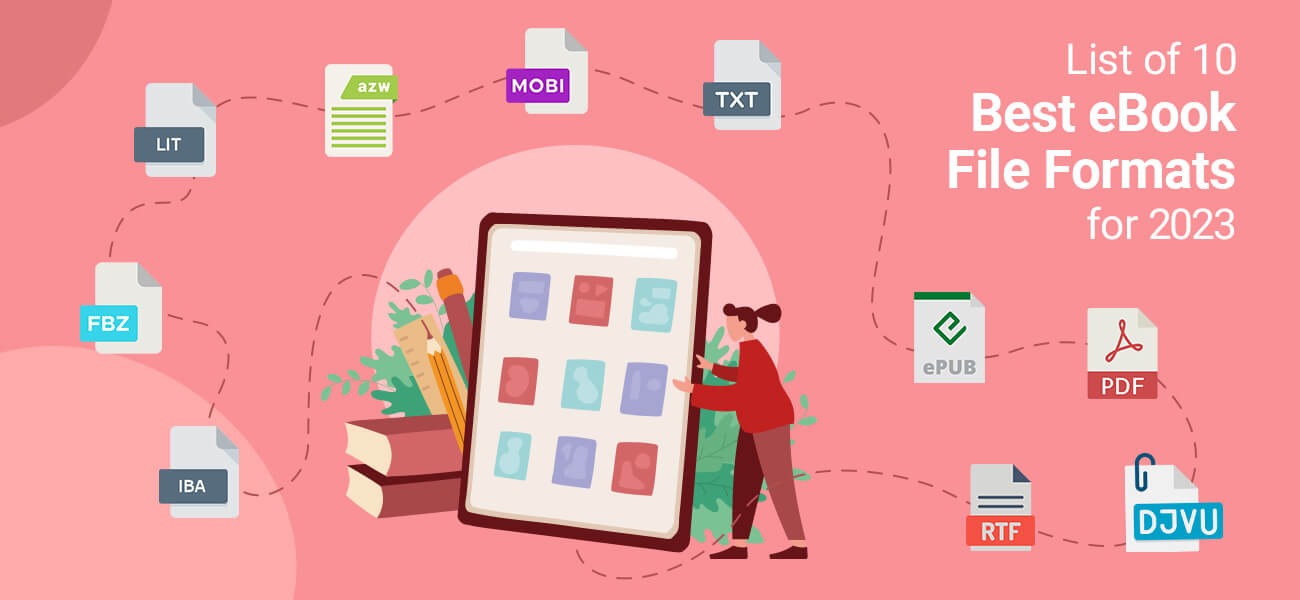
Overview Of Popular Ebook Formats
| Format | Description | Best For | Device Support |
|---|---|---|---|
| EPUB | Widely used open standard with flexible text flow. | Most general ebooks, supports reflowable text. | Most e-readers except Amazon Kindle. |
| MOBI/AZW | Amazon’s proprietary format for Kindle devices. | Kindle ebooks with basic formatting. | Amazon Kindle devices and apps. |
| Fixed layout format preserving original design. | Graphic-heavy books and print-ready files. | All devices, but less flexible on small screens. | |
| IBA | Apple’s iBooks Author format with multimedia support. | Interactive ebooks on Apple devices. | Apple iBooks app on iOS and macOS. |
Understanding these formats helps you publish ebooks easily. Tools like Easy eBook assist in creating ebooks in multiple formats without hassle.
Credit: www.proglobalbusinesssolutions.com
Key Ebook Formats And Their Unique Features
Ebooks come in various file formats. Each format serves different devices and reading needs. Knowing key ebook formats helps you choose the right one for your reading or publishing goals.
Below are the most popular ebook formats and what makes them unique.
Epub: The Most Widely Supported Format
EPUB is the global standard for ebooks. It works on almost all devices except Kindle. Its main feature is reflowable text, meaning content adjusts to screen size.
- Supports images, fonts, and interactive elements
- Open format, free to use and modify
- Ideal for novels, textbooks, and any text-heavy book
- Easy to customize for different reading preferences
EPUB files offer a smooth reading experience with flexible layouts.
Mobi: Kindle’s Native Format And Its Benefits
MOBI is Amazon Kindle’s native ebook format. It is designed specifically for Kindle devices and apps.
- Supports bookmarks, annotations, and text-to-speech
- Works well with Amazon’s DRM protection
- Good for simple text-based books
- Less flexible than EPUB for complex layouts
Kindle users prefer MOBI for its compatibility and Amazon ecosystem support.
Pdf: Fixed Layout For Precise Presentation
PDF files keep the exact layout of the original document. They are best for books needing precise formatting like manuals or cookbooks.
- Fixed page size and design
- Maintains fonts, images, and graphics exactly
- Not ideal for small screens due to lack of text flow
- Widely supported on all devices and platforms
PDFs are perfect for content where design consistency matters most.
Plain Text: Simplicity And Compatibility
Plain text files contain only basic text without formatting. They are the simplest and most compatible format.
- Very small file size
- Works on any device or software
- No images, fonts, or styling
- Best for quick reading or editing
Plain text is great for basic content or notes without distractions.
How Each Format Benefits Different Readers
Different ebook formats serve different reader needs and devices. Choosing the right format enhances the reading experience. Each format has unique strengths that suit specific types of content and devices. Understanding these benefits helps readers pick the best option for their preferences and gadgets.
Epub: Reflowable Text For Optimal Reading Experience
EPUB is the most popular ebook format for general reading. It uses reflowable text, which means the text adjusts automatically to fit any screen size. This makes reading easier on smartphones, tablets, and e-readers.
- Text size and font style can be customized by the reader.
- Supports images, links, and multimedia elements.
- Widely compatible with most e-readers except Kindle.
Readers enjoy a smooth, flexible reading experience with EPUB. It works well for novels, fiction, and non-fiction books.
Mobi: Seamless Integration With Kindle Devices
MOBI format is designed for Amazon Kindle devices. It offers seamless integration with Kindle’s software and hardware features.
- Supports bookmarks, annotations, and highlights.
- Optimized for Kindle’s e-ink displays.
- Allows easy syncing across Kindle apps and devices.
This format benefits Kindle users who want a hassle-free, native reading experience. MOBI files are ideal for those deeply embedded in the Amazon ecosystem.
Pdf: Ideal For Textbooks, Comics, And Reference Materials
PDF keeps the exact layout and design of a document. It is perfect for content where formatting matters, like textbooks, comics, and reference books.
| Feature | Benefit for Readers |
|---|---|
| Fixed layout | Maintains fonts, images, and page design exactly |
| Zoom and pan | Allows detailed viewing of images and diagrams |
| Universal compatibility | Can open on almost any device without special software |
Readers who need precise formatting and visuals benefit most from PDFs.
Plain Text: Lightweight And Easy To Use Across Devices
Plain Text ebooks use simple text files without any formatting. They are extremely lightweight and fast to load.
- Works on all devices, including old and simple ones.
- No special software needed—any text editor can open it.
- Best for readers who want distraction-free content.
Plain text suits people who value simplicity and speed over rich design. It is ideal for quick reads and basic content delivery.
Pricing And Affordability Of Ebook Formats
The cost of creating and distributing ebooks depends on the formats chosen. Different ebook formats require varied tools and effort. Choosing the right format can save money and time. Understanding pricing helps authors and publishers make smart decisions.
Cost Implications Of Creating Different Formats
Popular ebook formats include EPUB, MOBI, and PDF. Each has unique costs linked to creation and compatibility.
- EPUB: Industry standard, works on most devices. Requires software for formatting and validation.
- MOBI: Mainly for Amazon Kindle. May need extra conversion steps, adding to cost.
- PDF: Easy to create but less flexible for small screens. Often cheaper but less user-friendly.
Conversion between formats can add expenses, especially when done manually or using paid services. Complex formatting or multimedia content raises costs.
Free Tools And Software For Ebook Conversion
Many free tools help convert ebooks between formats, reducing expenses. Some popular options include:
| Tool Name | Supported Formats | Key Features |
|---|---|---|
| Calibre | EPUB, MOBI, PDF, AZW3 | Format conversion, library management, metadata editing |
| Sigil | EPUB | WYSIWYG editor, supports HTML and CSS editing |
| Online-Convert | Various ebook formats | Quick online conversion, no installation needed |
Using free software requires time for learning and manual adjustments. Automated solutions like Easy eBook reduce manual work and speed up creation.
Considerations For Self-publishers And Authors
Self-publishers must balance cost with quality and reach. Key points to consider:
- Budget: Low-cost tools save money but may need more effort.
- Format Choice: Select formats popular with your audience and platform.
- Time Investment: Manual formatting takes time; automation saves hours.
- Monetization: Proper formatting improves sales on platforms like Amazon KDP.
Easy eBook offers a low one-time price and creates up to 50,000 ebooks quickly. It helps authors skip complex tools and focus on content and sales.
Pros And Cons Based On Real-world Usage
Choosing the right ebook file format affects how readers enjoy your content. Each format has strengths and weaknesses that show up in daily use. Understanding these helps you pick the best option for your ebook projects.
Epub: Flexibility Vs. Compatibility Challenges
EPUB is the most popular ebook format today. It offers flexible layout and resizable text that adapts to different screen sizes. Readers can adjust fonts and backgrounds for better comfort.
EPUB files support rich media like images, audio, and video. This makes them great for interactive ebooks and textbooks.
Drawbacks:
- Some older devices and apps do not fully support EPUB features.
- Formatting may look different across readers due to varied software implementations.
- Amazon Kindle devices require conversion from EPUB, adding a step for authors.
Mobi: Kindle Focused But Limited Outside Amazon
MOBI format is designed mainly for Amazon Kindle devices. It works smoothly on Kindle apps and readers.
Benefits:
- Strong compatibility with Kindle ecosystem.
- Supports bookmarks, annotations, and DRM protection.
Limitations:
- Not widely supported outside Amazon devices.
- Does not support advanced formatting like EPUB.
- Kindle now prefers AZW3 and KFX formats, making MOBI less common.
Pdf: Layout Preservation Vs. Poor Small Screen Experience
PDF keeps the exact page layout, fonts, and images as designed. This is ideal for documents with complex formatting, charts, or fixed designs.
Readers see the ebook exactly as the author intended, making it perfect for manuals or brochures.
Challenges:
- PDFs do not adapt well to small screens like phones.
- Zooming and scrolling can be cumbersome on mobile devices.
- Limited options for changing text size or style.
Plain Text: Universality Vs. Lack Of Formatting
Plain text files are the simplest ebook format. They work on any device and app because they contain only text with no special formatting.
Advantages:
- Universal compatibility with all devices.
- Very small file size and fast loading.
Disadvantages:
- No support for images, fonts, or layouts.
- Books may look dull and hard to read without formatting.
- No interactive features or multimedia.
Credit: www.adobe.com
Specific Recommendations For Choosing The Right Format
Choosing the best ebook file format depends on the content type and how readers will access it. Different formats offer unique features suited for various reading experiences. Understanding these options helps deliver a smooth, enjoyable reading experience.
When To Use Epub: Novels, Standard Books, And Adaptability
EPUB is the most popular ebook format. It adapts well to different screen sizes and devices. This makes it ideal for novels and standard books with flowing text.
- Supports reflowable text for easy reading on phones, tablets, and e-readers.
- Allows multimedia, links, and interactive features.
- Widely supported by most ebook apps and devices except older Kindles.
This format suits authors and publishers wanting flexible, professional ebooks that look good everywhere.
When To Use Mobi: Kindle Devices And Offline Reading
MOBI works best for Kindle users. It is compatible with all Kindle devices and apps. MOBI supports offline reading and bookmarks, making it practical for Kindle readers.
- Use MOBI when targeting Amazon’s Kindle store or Kindle users.
- Offers solid text formatting with some interactive options.
- Less adaptable than EPUB but optimized for Kindle’s ecosystem.
MOBI is the go-to for authors publishing specifically on Kindle platforms.
When To Use Pdf: Fixed Layouts Like Manuals And Comics
PDF keeps the exact layout of pages. This is perfect for manuals, comics, and books with complex designs. Text, images, and graphics stay in fixed positions.
- Ideal for content where appearance matters more than adaptability.
- Works well on computers and tablets but less flexible on small screens.
- Good for print-ready ebooks or documents requiring precise formatting.
Choose PDF for ebooks that must look the same on every device.
When To Choose Plain Text: Basic Content And Maximum Compatibility
Plain Text files use no special formatting. They contain only simple text and are compatible with almost all devices and apps.
- Best for basic content without images or special layout needs.
- Loads quickly and works on any reading device or software.
- Not suitable for books needing images, links, or styled text.
Plain Text fits simple projects or when maximum compatibility is required.
Tips For Sending And Reading Ebook Formats On Kindle
Kindle supports various ebook formats, but understanding how to send and read them is key. This section shares simple tips to improve your Kindle reading experience. Use these techniques to handle different formats easily and enjoy your ebooks without hassle.
Using ‘send To Kindle’ With Epub And Mobi Files
Send to Kindle is a handy tool for transferring ebooks. Kindle natively supports MOBI files, but now also supports EPUB files via this service.
- Send EPUB or MOBI files by emailing them to your Kindle email address.
- Use the Send to Kindle app on Windows or Mac for quick transfers.
- Ensure your file is correctly formatted to avoid display issues.
Sending EPUB files directly is simpler now, but MOBI remains widely compatible. Always double-check the file format before sending.
Managing Pdfs On Kindle For Best Readability
PDFs are common but tricky on Kindle. They often show small text or fixed layouts.
- Use Kindle’s zoom and pan features to read PDFs.
- Convert PDFs to Kindle formats for better text flow.
- Send PDFs via Send to Kindle to enable conversion options.
PDFs work best on Kindle tablets or apps with larger screens. On basic Kindles, conversion improves readability greatly.
Converting Between Formats For Optimal Use
Converting ebooks helps match the format with your device’s strengths.
| Source Format | Recommended Target Format | Conversion Tool | Reason |
|---|---|---|---|
| EPUB | MOBI or AZW3 | Calibre, Online converters | Better Kindle compatibility and formatting |
| AZW3 or MOBI | Calibre, Send to Kindle conversion | Improved text reflow and readability |
Use Calibre or Kindle’s Send to Kindle service to convert files easily. Always test the converted ebook on your device before extensive reading.
Credit: www.audiorista.com
Conclusion: Making The Best Ebook Format Choice
Choosing the right ebook format shapes how readers enjoy your content. It also affects how easily your book works on different devices. Publishers and authors need to pick a format that fits their goals and audience. This section breaks down key points to consider for that choice.
Balancing Reader Experience And Device Compatibility
A great ebook format must offer a smooth reading experience. It should display text and images clearly. At the same time, it must be compatible with many devices like Kindle, tablets, and smartphones.
EPUB is widely supported and adapts well to screen sizes. It supports interactive features and reflowable text for easy reading. MOBI suits Kindle users but has fewer features. PDF keeps the exact layout but can be hard to read on small screens.
Authors should weigh these factors:
- How readers prefer to consume ebooks
- Which devices most readers use
- Importance of layout versus flexibility
Future Trends In Ebook Formats
Technology is changing ebook formats. New standards focus on richer content and better interaction. Formats are evolving to include audio, video, and animations inside ebooks.
Artificial intelligence tools like Easy eBook speed up ebook creation. They allow quick conversion into multiple formats without complex design work. This means faster publishing and wider reach.
Expect formats to become more adaptable, supporting:
- Personalized reading experiences
- Integration with online platforms
- Enhanced multimedia capabilities
Final Recommendations For Readers And Publishers
Readers should pick formats that work with their devices and reading habits. Publishers must choose formats that maximize reach and maintain quality.
| Audience | Recommended Format | Reason |
|---|---|---|
| Casual Readers | EPUB | Flexible, widely compatible, easy to read |
| Kindle Users | MOBI or AZW | Optimized for Kindle devices |
| Professionals & Designers | Preserves exact layout and formatting |
Publishers using tools like Easy eBook can create thousands of ebooks fast. They save time and effort while reaching many platforms. Customizing ebooks with names and images adds a personal touch readers appreciate.
Choosing the best ebook format helps deliver a quality experience. It supports growth in a fast-changing digital market.
Frequently Asked Questions
What Is The Best File Format For Ebooks?
The best file format for eBooks is EPUB. It adapts to different screen sizes and supports reflowable text. Kindle devices now natively support EPUB. PDF suits fixed-layout content but lacks flexibility on small screens. EPUB offers a better reading experience across most e-readers.
Which Format Is Better, Epub Or Mobi?
EPUB is better for most users due to wide compatibility and reflowable text. MOBI mainly supports older Kindle devices. EPUB adapts to screen size, enhancing readability across platforms. Choose EPUB for flexibility and MOBI only for legacy Kindle support.
Should I Send Epub Or Mobi To Kindle?
Send EPUB files to Kindle using “Send to Kindle” for better formatting and compatibility. Use MOBI only for side-loading. EPUB adapts to screen size, offering a superior reading experience.
Are Kindle Books Pdf Or Epub?
Kindle books primarily use the EPUB format for reflowable text and PDFs for fixed layouts. EPUB adapts to screen sizes, offering a better reading experience. PDFs preserve layout but can be hard to read on small screens. Kindle now supports EPUB natively via “Send to Kindle.
“
Conclusion
Choosing the right ebook format makes reading easier and more enjoyable. EPUB works well on most devices, while PDF keeps the layout fixed. MOBI suits Kindle users best. Knowing these formats helps you share and sell ebooks more effectively. For those who want to create ebooks quickly and simply, consider using Easy eBook. This tool lets you build professional ebooks with just a few clicks. Start creating ebooks that reach more readers and grow your online business today.