
Disclosure: this article contains an affiliate link. If you buy through it, we may earn a commission.
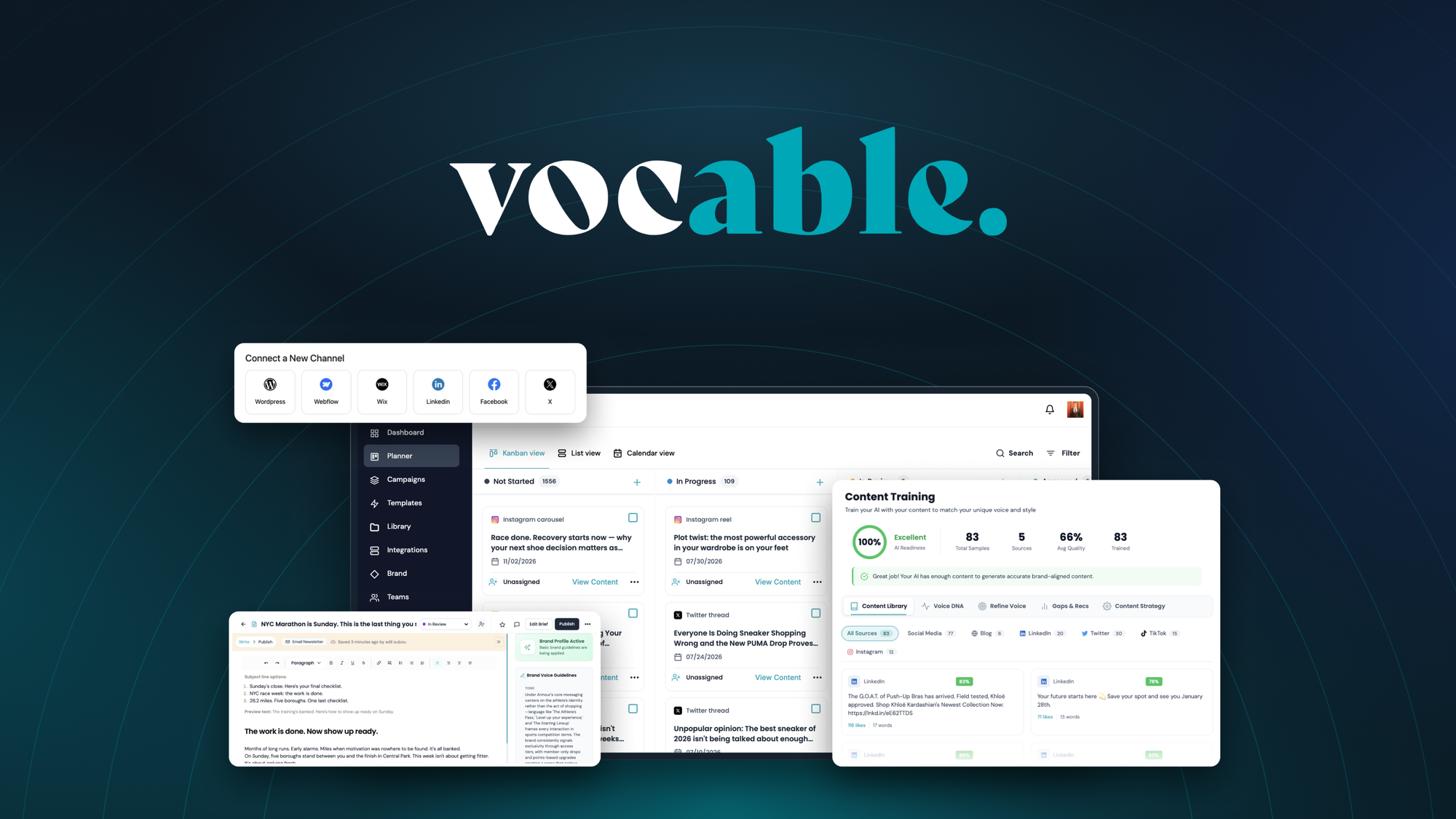
Vocable AI provides automated content campaign planning and copywriting designed to build full marketing calendars from a single topic. In this vocable ai review, the platform serves as a multi-channel drafting tool that creates 30-day plans while matching your custom brand tone. It fits small teams and marketers who need steady online posts without spending hours writing every line by hand.
Is Vocable AI Worth It for Content Marketers?

Yes, it’s worth it if you struggle to keep up with steady publishing across several marketing channels and want long schedules generated in minutes. The tool builds a full 30-day content campaign from one starting prompt, which saves hours of brainstorming and blank-page drafting. If you want manual control over every sentence, relying on automated campaign builders might feel limiting.
The software combines high-level planning with text drafting. Instead of asking an assistant for individual social media posts or articles one at a time, you give the system a single goal or subject. The engine generates a structured schedule mapped across your channels. It also keeps your brand voice built into the generation settings, so the text doesn’t sound like generic machine output.
However, content output still demands human judgment. Automated systems can produce clean text quickly, but search engines reward original information and firsthand perspective. The Google Search Central helpful content guidelines make it clear that pages must provide genuine value and depth, rather than basic automated summaries. You’ll get the best results when you treat the generated drafts as starting material that you polish before publishing.
What Core Features Does Vocable AI Include?
The software focuses on three core tools that turn high-level campaign themes into finished marketing assets across your publishing platforms.
One-Click 30-Day Campaign Planning
The main feature is its automated campaign calendar generator. When you enter a primary campaign goal or product topic, the system plans out channel-specific posts for an entire month in one click.
This setup prevents the disjointed messaging that happens when you write posts day by day. A product launch, for example, needs teaser updates, educational posts, reminder notices, and follow-up messages spread across multiple weeks. Having that whole sequence laid out helps maintain consistent audience messaging across all your active platforms.
AI Templates and Smart Text Editor
Once your calendar is mapped, you write and refine the copy inside a dedicated smart editor. The platform offers built-in writing templates tailored for specific types of marketing copy and platform formats.
The editor applies your preset brand voice directly during text generation. This means you don’t have to copy and paste style instructions into every single writing prompt. When you draft new sections or expand an outline, the text naturally follows your company’s tone.
Real-Time Document Health Scoring
Writing tools often generate text without showing you how readable or structured it is. Vocable AI includes real-time document health scoring right beside the workspace.
As you edit, expand, or trim sentences, the health score updates instantly. It monitors structural flow, clarity, and quality markers so you can spot thin, rambling, or unhelpful sections before anything goes live.
How Does Vocable AI Compare to Traditional Workflows?
Content creation normally requires jumping between brainstorming spreadsheets, separate writing documents, and style guides. The table below shows how using Vocable AI changes those day-to-day production tasks.
| Marketing Task | Traditional Manual Process | Process with Vocable AI |
|---|---|---|
| Campaign Planning | Writing social calendars across 4 to 8 hours | Generates a 30-day schedule in one click |
| Multi-Channel Adaptation | Rewriting one core message manually for each app | Creates channel-specific formats from one topic |
| Tone Consistency | Checking every draft against an external style guide | Applies built-in brand voice automatically |
| Quality Control | Reading through drafts without clear metrics | Uses real-time document health scoring |
| Software Access | Monthly subscription overhead across multiple tools | Provided through a single lifetime access license |
What Should You Check Before Buying?
Software buyers often face hidden workflow friction if they don’t check their requirements ahead of time. Keep these practical points in mind:
- Check which channels your team uses daily, and confirm that your marketing mix matches what the generator creates.
- Decide who on your team will review drafts, since automated copy still requires human oversight to ensure factual accuracy.
- Determine how many distinct brand voices you need to manage if you run campaigns for different clients or sub-brands.
- Confirm that your publishing workflow works smoothly with text created in an external editor.
Tip: Before generating your first month-long schedule, write out three clear brand guidelines covering your company’s desired tone, audience level, and avoided buzzwords.
Who Is This Tool Best For?

Understanding your team’s workflow helps you decide if this software fits your operation:
Who Suits Vocable in Our AI Review
- Solo creators and founders: If you manage your own marketing, this tool eliminates the daily dread of staring at an empty calendar.
- Small marketing teams: Teams balancing multiple channels can map out long promotions without hiring extra copywriters.
- Agencies producing standard campaigns: It speeds up top-of-funnel content production when building initial drafts for clients.
Who It Does Not Suit
- Technical and research writers: If your copy relies on proprietary lab data, original journalism, or specialized engineering analysis, automated templates can’t replace manual reporting.
- Teams wanting hands-off publishing: The software writes and organizes copy, but you still need team members to review, approve, and place it.
How to Get the Best Results from Your Campaigns
To get the most out of the system, follow a structured workflow rather than generating content randomly.
- Define your core objective. Start with one specific commercial goal, such as launching a seasonal promotion or introducing a service, rather than a broad subject.
- Set your brand voice rules. Configure your preferred tone, whether formal, friendly, or authoritative, so every generated draft fits your company identity.
- Generate the campaign outline. Use the one-click campaign tool to map out the full 30-day cross-channel schedule.
- Review the calendar distribution. Look through the generated post dates to ensure the mix of promotional and helpful updates feels balanced.
- Select a writing template. Open individual calendar slots and pick the built-in template that best matches the target channel.
- Draft inside the editor. Generate the initial text using your saved brand settings to keep the tone consistent.
- Monitor the health score. Check the real-time document score, shortening complex sentences and clarifying weak spots until the score shows good readability.
- Add personal details. Insert original company anecdotes, unique product details, or specific customer stories before scheduling the final text.
What Are the Real Operational Trade-Offs?
Using automated campaign software involves practical trade-offs. You gain production speed, but you sacrifice completely custom sentence structures. A campaign that used to take days now takes minutes, but you must spend time reviewing the generated output for brand alignment.
If your marketing strategy relies on high-volume publishing, automated drafting is a smart choice. If your brand relies on rare, highly opinionated thought leadership, spending hours writing individual pieces manually may still be the better route.
Another factor is your licensing overhead. Many modern AI copywriting apps lock users into expensive monthly subscriptions that drain marketing budgets. Getting software with lifetime access keeps overhead predictable, which is a major advantage for lean organizations.
Why Are Content Campaigns Better Than Single Posts?
Writing isolated updates leaves your marketing feeling scattered. A single post rarely convinces someone to buy a product, sign up for a demo, or change their habits. Consistent communication over time is what builds trust.
When you plan 30 days of updates around one goal, each post supports the next. Educational updates answer questions early in the month, proof-focused posts show practical results in the middle, and direct calls to action encourage conversions toward the end. Vocable AI handles this sequencing automatically, keeping your multi-channel messaging aligned.
Related guides
Frequently Asked Questions

Can I plan campaigns for multiple marketing channels?
Yes, the platform maps out channel-specific content campaigns from a single goal or topic. It formats your updates to suit the requirements of your chosen marketing channels while keeping your overall campaign message consistent across platforms.
How does the tool keep my writing style consistent?
Vocable AI keeps your brand voice built directly into the system. When you use the smart editor and templates, the AI references your tone settings so the generated copy sounds natural and aligned with your brand.
What does the document health score measure?
The real-time document health score measures the structural balance and quality of your text inside the editor. It guides you as you edit, showing you where the copy needs clearer pacing or cleaner phrasing before you publish.
Do I have to pay a recurring monthly subscription?
No, the tool includes lifetime access to Vocable AI. You don’t have to pay monthly subscription fees to keep using the software for your ongoing campaign planning and multi-channel drafting tasks.
Can I generate a campaign without a specific topic?
You need at least one central goal or topic to start the generation process. The system uses that central idea to map out the entire 30-day sequence of channel-specific posts in a single click.
Does the software replace human editors completely?
No, it doesn’t eliminate the need for human review. While it writes drafts quickly and monitors document health, a human team member should always verify factual details and add company insights before publishing.
If you want to end blank-page frustration, build organized monthly marketing calendars, and maintain your brand voice across every channel, explore Vocable AI to see if its automated campaign generator matches your daily publishing needs.
Conclusion
If you’re ready to reclaim your schedule, it’s time to test the platform with a few of your own topics. You won’t regret letting the software handle the heavy lifting while you focus on the bigger picture. Give it a try this week and see how much faster your content workflow becomes.