

Disorganized client data can be a major headache. It hinders productivity and affects customer relations.
Imagine trying to find crucial client information in a sea of chaos. Without proper organization, data becomes a burden rather than an asset. Disorganized data leads to lost time, errors, and missed opportunities. Businesses rely on accurate data to make informed decisions and provide excellent service.
When client data is scattered, it disrupts workflow and causes frustration. It is essential to have a system in place to manage and organize this data effectively. This blog will explore the impact of disorganized client data and offer practical solutions to keep your data tidy and accessible. Let’s dive in and bring order to your chaotic data!
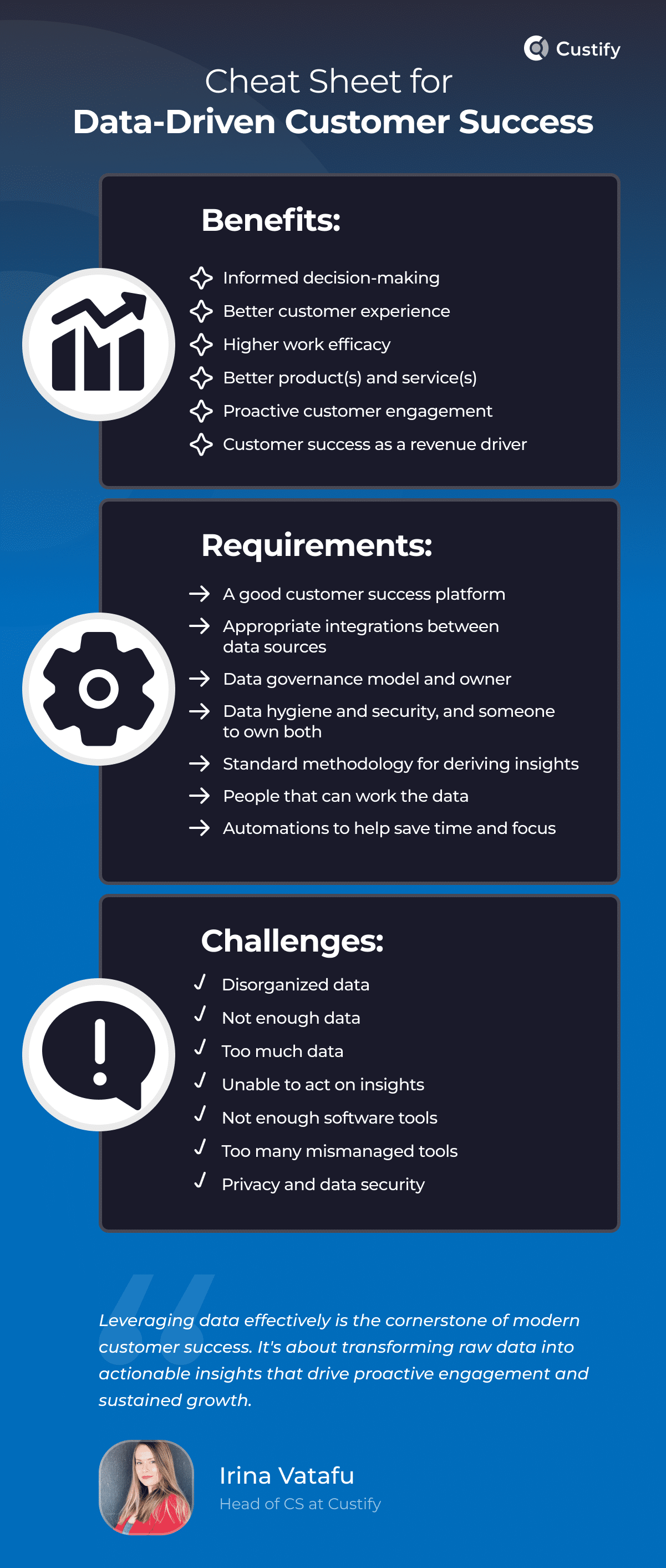
Credit: www.custify.com
Impact On Business
Disorganized client data can severely impact a business. When data is not managed well, it can lead to various problems that affect efficiency, customer satisfaction, and overall business performance. Let’s explore how disorganized client data can impact your business under the following subheadings: Loss of Efficiency and Customer Dissatisfaction.
Loss Of Efficiency
Disorganized client data can cause significant loss of efficiency in business operations. When data is scattered and unstructured, it becomes difficult to retrieve important information quickly. This leads to operational inefficiency and wasted time.
Consider a scenario where your sales team needs to access client information. If the data is poorly organized, they may spend hours looking for the right details. This not only delays their work but also disrupts the overall workflow.
Here are some key ways disorganized data affects efficiency:
- Data Retrieval: Slower access to necessary information.
- Data Quality: Increased chances of errors and outdated information.
- Information Overload: Difficulty in filtering relevant data from irrelevant data.
To illustrate the impact, see the table below:
| Issue | Impact |
|---|---|
| Slow Data Retrieval | Delays in decision-making |
| Poor Data Quality | Inaccurate reporting |
| Workflow Disruption | Reduced productivity |
Improving data organization can help mitigate these issues, leading to smoother operations and better use of resources.
Customer Dissatisfaction
Disorganized client data also results in customer dissatisfaction. When your team cannot access accurate and timely information, it negatively affects the customer experience.
For example, if a customer calls for support and your team cannot quickly retrieve their information, it creates frustration. This can damage client relationship management efforts and reduce customer loyalty.
Here are some specific ways disorganized data leads to customer dissatisfaction:
- Delayed Responses: Slow response times to customer inquiries.
- Inaccurate Information: Providing incorrect details to customers.
- Broken Trust: Customers lose confidence in your business.
Consider the following impact on client management:
| Issue | Customer Impact |
|---|---|
| Delayed Responses | Frustration |
| Inaccurate Information | Loss of trust |
| Broken Trust | Decreased loyalty |
To enhance client management, focus on improving data organization. This ensures your team can provide a seamless and positive customer experience.
Causes Of Disorganization
Disorganized client data can create significant challenges for businesses. Understanding the causes of this disorganization is crucial for improving data management practices. Below, we explore two primary causes: Poor Data Entry and Lack of Standardization.
Poor Data Entry
Poor data entry is a major cause of disorganized client data. Inaccurate or incomplete information can lead to significant data quality issues. Here are some common problems:
- Misspelled names
- Incorrect contact details
- Incomplete addresses
These errors arise due to several factors:
- Human error: Manual data entry often results in typos and mistakes.
- Lack of training: Employees may not be adequately trained in proper data entry techniques.
- Time constraints: Rushed work leads to errors.
Consequences of poor data entry include:
- Client information management becomes difficult.
- Inaccurate data affects business decisions.
- Information retrieval challenges slow down operations.
To tackle these issues, businesses can implement data cleansing techniques and provide proper training to employees. Ensuring accuracy during initial data entry can greatly enhance client database management.
Lack Of Standardization
Lack of standardization is another critical factor leading to disorganized data. Without standardized formats and procedures, data can quickly become inconsistent and hard to manage. Common issues include:
- Different date formats (e.g., MM/DD/YYYY vs. DD/MM/YYYY)
- Varied naming conventions (e.g., John Smith vs. Smith, John)
- Inconsistent address abbreviations (e.g., St. vs. Street)
These inconsistencies cause significant information retrieval challenges. They also contribute to CRM inefficiencies:
| Issue | Impact |
|---|---|
| Inconsistent data formats | Harder to search and sort data |
| Varied naming conventions | Duplicates and errors in records |
| Non-standard abbreviations | Confusion and miscommunication |
To address these problems, businesses should adopt data standardization practices. This involves:
- Creating uniform data entry guidelines
- Using standardized templates
- Regularly reviewing and updating data
Effective data organization strategies and client information management protocols help maintain data consistency. They ensure that all client information is accurate, up-to-date, and easily accessible.
Identifying Disorganized Data
Disorganized client data can create many problems. It is important to identify disorganized data to improve client information management. Disorganized data affects the efficiency of your business operations. Using effective data organization strategies can help you manage client data better. Below, we’ll explore how to identify disorganized data.
Signs To Look For
Recognizing disorganized data is the first step toward finding a solution. Here are some signs to look for:
- Inconsistent Data Entries: Different formats for names, addresses, or phone numbers.
- Duplicate Records: Multiple entries for the same client.
- Missing Information: Key fields like contact numbers or email addresses left blank.
- Outdated Information: Old addresses or phone numbers that are no longer valid.
- Data Entry Errors: Typographical errors and misspellings.
These signs can create difficulties in your customer relationship management (CRM). When data is inconsistent or incomplete, it affects the reliability of your client data analysis. Recognizing these signs early can help you employ effective data cleanup techniques.
Reviewing your data regularly is crucial. A periodic check can help identify and correct these issues. Using information retrieval systems can also help you find and fix disorganized data quickly. Below is a simple table to summarize the signs of disorganized data:
| Sign | Description |
|---|---|
| Inconsistent Data Entries | Different formats for the same data type |
| Duplicate Records | Multiple entries for the same client |
| Missing Information | Key fields are blank |
| Outdated Information | Old and invalid data |
| Data Entry Errors | Typographical errors and misspellings |
Common Issues
Disorganized data can lead to many common issues. These issues can hinder your business operations and client satisfaction:
- Data Quality Issues: Poor data quality can affect decision-making and strategy development.
- Client Data Integrity: Inaccurate or incomplete data can lead to misunderstandings with clients.
- Increased Operational Costs: More time and resources are needed to correct data errors.
- Compliance Risks: Inaccurate data can lead to non-compliance with data protection regulations.
- Client Dissatisfaction: Incorrect client information can lead to poor customer experiences.
These issues make it clear why maintaining organized data is crucial. Implementing effective data organization strategies can help mitigate these problems. Using tools and systems designed for client information management can help maintain data accuracy and integrity. Regular data audits and employing data cleanup techniques can also help reduce these common issues.
Addressing data quality issues ensures better client data analysis. This leads to more informed decision-making and better client interactions. Maintaining client data integrity helps build trust and improves customer relationship management. Here is a quick summary of the common issues caused by disorganized data:
| Issue | Impact |
|---|---|
| Data Quality Issues | Poor decision-making and strategy development |
| Client Data Integrity | Misunderstandings with clients |
| Increased Operational Costs | Higher costs for correcting data errors |
| Compliance Risks | Non-compliance with regulations |
| Client Dissatisfaction | Poor customer experiences |

Consequences For Teams
Disorganized client data can cause many problems for teams. It affects how they work and communicate. This can lead to mistakes and wasted time. Here, we will discuss the consequences for teams.
Increased Workload
When client data is disorganized, teams face an increased workload. They spend more time on information retrieval. This makes their tasks take longer. Instead of focusing on client relationship management, they are busy looking for missing information.
Disorganized data affects workflow efficiency. Teams often have to redo tasks because of lost or incorrect data. This can lead to frustration and burnout. They may feel overwhelmed by the amount of work that keeps piling up.
Consider the following impacts:
- Frequent data entry errors
- Delayed project timelines
- Increased stress levels
- Lower overall productivity
By improving data organization, teams can manage their workload better. They can focus on more valuable tasks, like improving client management and developing new strategies.
Communication Breakdowns
Disorganized client data can lead to communication breakdowns. Teams rely on accurate data for effective communication. If the data is messy, messages can get lost or misunderstood. This affects communication efficiency within the team and with clients.
Incorrect or missing information can lead to mixed messages. Teams might give clients wrong updates about their projects. This damages trust and can lead to losing clients.
Here are some common issues:
- Confusing email threads
- Incorrect client details
- Missed deadlines
- Duplicated efforts
Effective project management requires clear and precise communication. Teams need reliable data for data visualization and data integrity. This ensures everyone is on the same page. When data is organized, teams can communicate more effectively. They can provide better service and maintain strong client relationships.
Strategies For Improvement
Disorganized client data can cause many problems for businesses. It can lead to missed opportunities, poor decision-making, and inefficient operations. Fortunately, there are strategies for improvement that can help organize and manage client data effectively.
Data Cleaning Techniques
Data cleaning techniques are essential for data quality improvement. These methods help ensure that the information you have is accurate, complete, and reliable. Here are some key data cleaning techniques:
- Remove duplicates: Duplicate entries can skew your data analysis. Use tools to identify and remove these duplicates.
- Standardize data: Ensure that data follows a consistent format. For example, dates should be in the same format, and names should follow the same capitalization rules.
- Fill in missing values: Missing data can lead to inaccurate conclusions. Use methods like mean substitution or predictive modeling to fill in gaps.
- Correct errors: Look for and fix typos or incorrect entries. Automated scripts can help identify common errors.
Using these data cleaning methods can greatly enhance the quality of your data. This, in turn, improves the effectiveness of your client data management and customer relationship management systems.
Implementing Systems
Organizing client data requires robust systems. These systems help in data integration solutions and data categorization. Here are some effective strategies:
- Customer Relationship Management (CRM) software: CRMs like Salesforce or HubSpot can help manage client interactions and data effectively.
- Data Governance: Establish clear policies and procedures for data management. This includes defining roles and responsibilities for data handling.
- Automated data entry: Use tools that automate data entry to reduce errors and save time. This improves data quality.
- Regular audits: Conduct regular audits to ensure data accuracy and compliance with data governance policies.
Investing in these systems can lead to better data organization. It also facilitates more effective information retrieval and data analysis techniques. This, in turn, supports informed decision-making and improved business operations.
Tools For Organization
Disorganized client data can be a nightmare for businesses. It leads to errors, inefficiencies, and lost opportunities. Thankfully, there are various tools for organization that can help. These tools streamline the management of client information, improve accuracy, and save time. Let’s explore some effective solutions.
Software Solutions
Many software solutions are available to manage and organize client data. These tools improve Information Retrieval and ensure that your data is always up-to-date and accurate. Here are some key types of software to consider:
- CRM Solutions: Customer Relationship Management software helps manage client interactions and data throughout the customer lifecycle. Examples include Salesforce, HubSpot, and Zoho CRM. They offer tools for tracking communications, managing sales pipelines, and analyzing customer data.
- Database Management: Tools like Microsoft SQL Server, Oracle, and MySQL help manage large volumes of data. They ensure data integrity, security, and accessibility.
- Data Cleaning Software: Programs like OpenRefine and Trifacta help clean and standardize data. This process removes duplicates, corrects errors, and ensures consistency.
- Data Analysis Tools: Tools like Tableau, Power BI, and SAS are essential for analyzing data. They help in understanding trends, patterns, and insights.
These software solutions not only organize data but also enhance Client Management and Customer Relationship Optimization. By using these tools, businesses can ensure that their client data is accurate and accessible, leading to better decision-making and improved client satisfaction.
Automation Tools
Automation tools play a crucial role in managing and organizing client data. They reduce manual work and minimize errors. Here are some types of automation tools to consider:
- Workflow Automation: Tools like Zapier and Microsoft Power Automate automate repetitive tasks. They connect different applications and automate workflows, saving time and reducing errors.
- Client Data Integration: Tools like MuleSoft and Dell Boomi integrate data from various sources. They ensure that client information is consistent and up-to-date across all systems.
- CRM Automation: Many CRM solutions offer built-in automation features. These features automate tasks like sending follow-up emails, updating records, and scheduling appointments.
- Data Analysis Automation: Tools like Alteryx and RapidMiner automate data analysis processes. They help in quickly analyzing large datasets and generating insights.
Automation tools not only improve Data Organization but also enhance Client Management and Customer Relationship Optimization. By automating repetitive tasks, businesses can focus more on strategic activities and provide better services to their clients.
Training And Best Practices
Disorganized client data can cause many problems for businesses. Errors, inefficiencies, and lost opportunities can all result from poor data management. Implementing proper training and best practices is essential to ensure data is handled correctly. Effective training programs and robust protocols can make a significant difference in maintaining organized and accurate client data.
Employee Training Programs
Employee training in data handling is crucial for maintaining organized client data. Well-trained employees can efficiently manage data, reducing errors and improving overall data quality. A comprehensive training program should cover various aspects of client data management, from basic data entry to advanced data governance.
Consider the following key components for an effective training program:
- Introduction to Data Organization Strategies: Employees should understand the importance of organizing data systematically.
- Data Entry Best Practices: Teach employees how to enter data accurately and consistently.
- Information Architecture: Explain how data is structured and stored within the company’s systems.
- Customer Relationship Management (CRM) Tools: Train employees on using CRM tools for efficient client data management.
- Data Quality Improvement Techniques: Provide methods for regularly checking and improving data quality.
Training should be ongoing, with regular updates and refresher courses. Consider using different formats, such as:
- Workshops
- Online courses
- In-person training sessions
A combination of these methods can cater to different learning styles and ensure thorough understanding.
Establishing Protocols
Establishing clear protocols is essential for effective data management. Protocols ensure that all employees follow the same procedures, leading to consistent and accurate data handling. Protocol development for data management involves creating detailed guidelines and workflows.
Here are some key elements to include in your data management protocols:
| Protocol | Description |
|---|---|
| Data Entry | Guidelines for accurate and consistent data entry. |
| Data Storage | Procedures for organizing and storing data securely. |
| Data Quality Checks | Regular checks to ensure data accuracy and completeness. |
| Data Access | Rules for accessing and sharing data within the organization. |
Clear protocols can also improve workflow optimization. When employees know exactly how to handle data, they can work more efficiently. Consistent protocols also make it easier to identify and resolve issues quickly.
Communication is key when establishing these protocols. Ensure all employees are aware of the protocols and understand their importance. Regularly review and update protocols to keep up with changes in technology and business processes.
Implementing these strategies will help maintain organized, accurate, and reliable client data, ultimately improving business operations and customer satisfaction.

Credit: brightmetrics.com
Case Studies
Disorganized client data can cause many problems for businesses. It leads to wasted time, lost opportunities, and poor decision-making. To show how companies can overcome these issues, we will look at some case studies. These examples will highlight real-world transformations and lessons learned from improving client data management.
Successful Transformations
Many businesses have transformed their operations by focusing on client data management. Let’s explore a few examples:
Company A, a mid-sized retail firm, struggled with disorganized client data. They implemented a Data Governance Framework to create consistent data policies. The steps they took included:
- Standardizing data entry processes
- Implementing regular data audits
- Using Data Cleaning Strategies to remove duplicates and errors
After six months, Company A saw:
| Metric | Before | After |
|---|---|---|
| Data Errors | 15% | 2% |
| Customer Complaints | 30/month | 5/month |
Another example is Company B, a healthcare provider, which integrated their data using Client Information Systems and Customer Data Integration techniques. They faced challenges like fragmented records and inconsistent data. By adopting Data Quality Improvement practices and CRM Best Practices, they:
- Centralized patient records
- Automated data entry with Data Analysis Tools
- Trained staff on Data Organization Techniques
Results for Company B included:
- Improved patient follow-ups
- Higher data accuracy
- Enhanced patient satisfaction
Lessons Learned
Through these case studies, we learn valuable lessons about managing client data. First, a Data Governance Framework is critical. It sets the rules for how data is handled and ensures consistency. This approach helps prevent errors and maintains data integrity.
Another lesson is the importance of Data Cleaning Strategies. Regularly removing incorrect or outdated data keeps databases accurate. This practice saves time and prevents mistakes. Additionally, using CRM Best Practices helps in maintaining organized and accessible client data.
Data Organization Techniques are also vital. Standardizing how data is entered and stored makes retrieval easier. This practice improves efficiency and helps in better decision-making. Furthermore, integrating data using Client Information Systems ensures that all departments have access to the same information. This integration avoids redundancy and enhances collaboration.
Lastly, training staff on Client Data Management and Client Data Visualization is essential. Employees need to understand how to manage and interpret data. This training improves their ability to use data effectively and supports informed decision-making.
In summary, these transformations show that focusing on data quality, using the right tools, and adopting best practices can significantly improve business operations. The lessons learned highlight the importance of a structured approach to managing client data.
Frequently Asked Questions
What Causes Disorganized Client Data?
Disorganized client data is often caused by inconsistent data entry, lack of standardized processes, and inadequate data management systems.
How Can You Organize Client Data?
You can organize client data by using consistent data entry practices, implementing a CRM system, and regularly updating and cleaning the data.
Why Is Organized Client Data Important?
Organized client data is important because it improves decision-making, enhances customer relationships, and increases operational efficiency.
What Are The Risks Of Disorganized Data?
Disorganized data can lead to poor decision-making, inefficient processes, data breaches, and lost business opportunities.
Conclusion
Organizing client data is essential for business success. It boosts efficiency and accuracy. Clean data leads to better decisions and satisfied clients. Implement easy-to-use tools and processes. Regularly update and audit your data. Stay consistent and focused. Enjoy smoother operations and happier customers.
Embrace good data habits today. Your business will thank you.