

“Mailchimp Reviews”
Looking for an email marketing tool that can turn your customer data into real revenue? Mailchimp might be exactly what you need.
But before you dive in, you probably want to know if it lives up to the hype. How easy is it to use? Are the features really worth it? And what about the price—will it fit your budget as your list grows? In this Mailchimp review, you’ll get straight answers on everything from its powerful AI-driven automations to the hidden costs and tricky interface issues many users face. Ready to see if Mailchimp is the right fit for your business? Start your 14-day free trial† today and experience firsthand how it can transform your marketing efforts. Try Mailchimp now and discover whether it’s the tool that will help your business grow smarter and faster.
Credit: www.emailvendorselection.com
Introduction To Mailchimp And Its Purpose
Mailchimp is a popular email marketing platform designed to help businesses turn customer data into revenue. It offers tools to create, send, and analyze email campaigns with ease. The platform uses generative AI features and actionable insights to improve audience growth and conversion rates.
Users can benefit from enhanced automations, custom-coded email templates, and personalized onboarding. Mailchimp also provides customizable popup forms to capture leads effectively. A 14-day free trial lets users explore the platform before choosing a plan that fits their needs.
Overview Of Mailchimp As An Email Marketing Platform
Mailchimp offers a range of features that simplify email marketing:
- Email Campaign Creation: Easy-to-use drag-and-drop editor.
- Automation: Set up automated emails based on user behavior.
- Audience Insights: Detailed reports on subscriber activity.
- Segmentation: Target specific groups within your audience.
- Templates: Customizable and code-friendly options.
- Integration: Connects with e-commerce and CRM platforms.
These features help businesses create personalized, effective campaigns that engage customers. Mailchimp’s tools work well for both beginners and experienced marketers.
Who Can Benefit From Using Mailchimp In 2025
Mailchimp suits a wide range of users in 2025. It helps businesses and organizations grow their email marketing efforts efficiently.
| User Type | Benefits |
|---|---|
| Small Businesses | Affordable plans and easy setup for beginners. |
| Nonprofits | Fundraising tools and audience engagement features. |
| E-commerce Stores | Automation and integration with shopping platforms. |
| Marketers | Advanced segmentation and AI-driven insights. |
| Content Creators | Templates and tools to grow subscriber lists. |
Mailchimp adapts to different needs with flexible plans and scalable features. Its user-friendly interface supports users with varying experience levels.
Credit: www.emailtooltester.com
Key Features That Make Mailchimp Unique
Mailchimp offers a robust set of features designed to simplify email marketing and boost campaign results. Its tools help users create, automate, and personalize messages effectively. These features suit both beginners and experienced marketers. The platform also supports nonprofits with specialized fundraising tools.
Automation Capabilities: Streamlining Campaigns For Efficiency
Mailchimp’s automation tools save time by sending emails automatically based on user actions. You can set up workflows for welcome emails, follow-ups, and abandoned cart reminders.
- Pre-built automation templates for quick setup
- Enhanced automations with AI insights to improve timing
- Actionable data on audience growth and conversion funnels
These features reduce manual work and keep your audience engaged consistently.
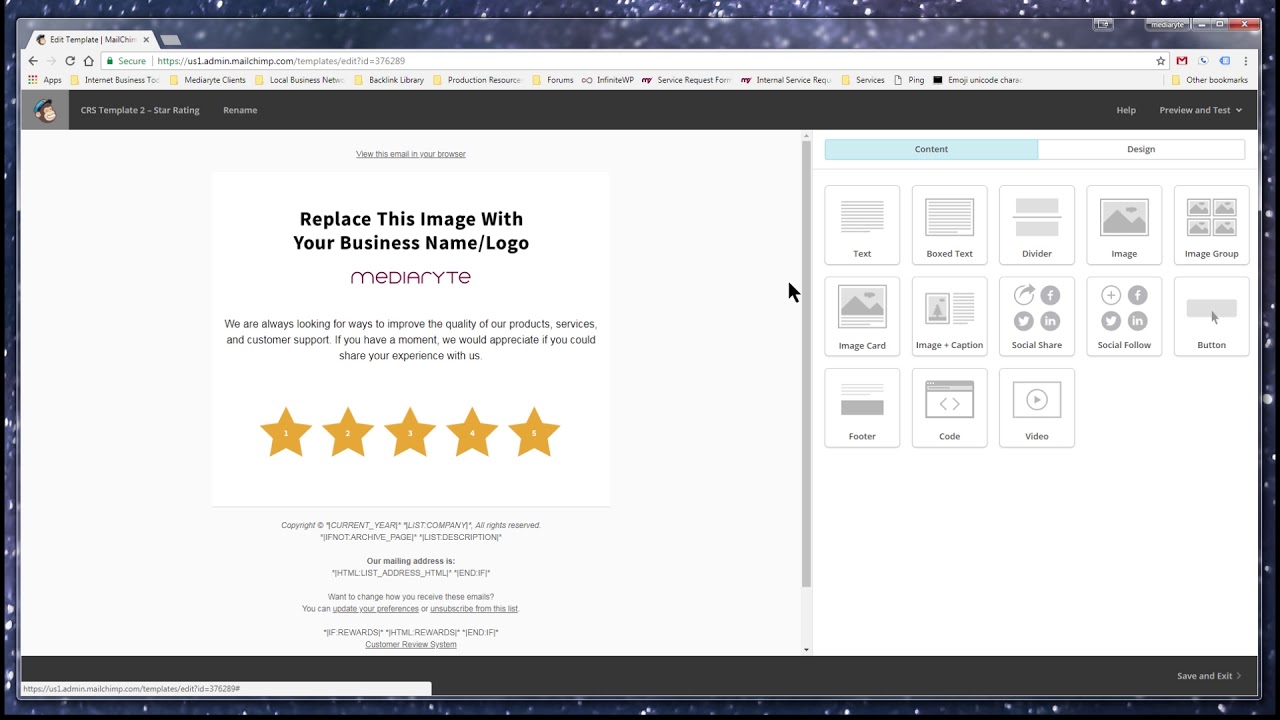
Drag-and-drop Email Builder: Simplifying Design For Users
The drag-and-drop editor lets users create professional emails without coding skills. It offers:
- Custom-coded email templates for advanced design
- Easy placement of images, text, and buttons
- Responsive designs that look good on all devices
This builder helps create attractive emails quickly and easily.
Advanced Segmentation And Personalization: Targeting The Right Audience
Mailchimp allows precise targeting with advanced segmentation. You can group contacts by behavior, location, or purchase history.
- Personalized content for higher engagement
- Customizable popup forms to capture specific audience data
- Use customer data to tailor messages and offers
This focus improves campaign results by reaching the right people.
Integration Options: Connecting With Other Tools And Platforms
Mailchimp connects easily to many third-party tools. This helps unify marketing efforts and data.
| Type | Examples |
|---|---|
| eCommerce | Shopify, WooCommerce, Magento |
| Social Media | Facebook, Instagram, Twitter |
| CRM & Analytics | Salesforce, Google Analytics |
These integrations streamline data flow and campaign management.
All-in-one Fundraising Features For Nonprofits
Mailchimp offers tools tailored for nonprofits to raise funds effectively.
- Donation forms and landing pages built into campaigns
- Automated thank-you emails to donors
- Tracking tools to monitor fundraising success
These features help nonprofits focus on their mission, not technical tasks.
Pricing And Affordability Breakdown
Mailchimp’s pricing offers flexible options tailored to different business sizes. Understanding these costs helps manage your marketing budget effectively. This section explains Mailchimp’s pricing plans, how contact list size affects costs, overage charges, and the differences between free and paid plans.
Understanding Mailchimp’s Pricing Structure And Plans
Mailchimp provides several plans to fit varied needs:
- Free Plan: Basic features with limited contacts and sends.
- Essentials Plan: More emails and support options.
- Standard Plan: Adds advanced automation and insights.
- Premium Plan: Full features and highest contact limits.
Each plan includes core tools, but higher tiers add more advanced functions. A 14-day free trial of the Standard plan is also available for testing.
Costs Related To Contacts And Subscriber Lists
Mailchimp pricing depends heavily on your number of contacts. Each plan sets a limit on the subscriber list size, which affects monthly fees.
| Plan | Contact Limit | Monthly Price (Approx.) |
|---|---|---|
| Free | Up to 500 contacts | $0 |
| Essentials | Up to 50,000 contacts | Starts at $9.99 |
| Standard | Up to 100,000 contacts | Starts at $14.99 |
| Premium | Over 200,000 contacts | Starts at $299 |
Costs rise as your subscriber list grows. Businesses must choose plans based on their expected audience size.
Overage Charges And Their Impact On Budgets
Exceeding your contact limit triggers overage charges. These extra fees increase monthly costs unexpectedly.
- Mailchimp charges for each additional contact beyond your plan’s cap.
- Overages can quickly strain small business budgets.
- Monitoring list size regularly avoids surprise expenses.
Choosing a plan with some buffer for growth helps control these charges.
Comparing Free Plan Limitations With Paid Options
The Free plan suits beginners but has key limits:
- Only 500 contacts allowed.
- Limited email sends per month.
- Basic templates and automation features.
- No phone support or advanced analytics.
Paid plans unlock:
- Higher contact and email send limits.
- Advanced automations and AI-driven insights.
- Custom templates and detailed reports.
- Priority customer support.
Upgrading offers more power but requires a bigger budget.
Pros And Cons Based On Real-world Usage
Mailchimp is a popular email marketing tool used by many businesses. Real users share both praise and criticism. Understanding these pros and cons helps to decide if Mailchimp fits your needs.
Advantages: User-friendly Automation And Wide Integrations
Mailchimp offers easy-to-use automation that simplifies email campaigns. Users can set up workflows without coding skills. The platform also supports many integrations with apps like Shopify, WordPress, and social media.
- Drag-and-drop email builder
- Pre-built automation templates
- Connects with CRM, eCommerce, and analytics tools
- Personalized onboarding to guide new users
These features save time and help target customers effectively.
Disadvantages: Complex Pricing And Interface Challenges
Mailchimp’s pricing can be confusing and costly. Free and Essentials plans have limits on contacts and features. Standard and Premium plans offer more but at a higher price.
| Plan | Price Range | Key Limits |
|---|---|---|
| Free | $0 | Up to 500 contacts, limited automations |
| Essentials | Starts at $13/month | More contacts, basic automation |
| Standard | Starts at $20/month | Advanced automations, retargeting ads |
| Premium | $350+/month | Unlimited contacts, advanced insights |
The interface can be overwhelming for beginners. Some users find navigation unclear and features hidden.
Customer Support Experience: Accessibility And Responsiveness
Customer support is mixed in reviews. Free plan users get limited support options. Paid plans include email and chat support, but response times vary.
- Helpful knowledge base and tutorials
- Live chat available for Standard and Premium plans
- Some users report delays in complex issue resolution
Support is accessible but can improve in speed and depth.
Deliverability Concerns And Email Spam Issues
Some users report email deliverability problems. Campaigns sometimes land in spam folders. Mailchimp maintains good standards but strict rules on content and list quality affect results.
- High bounce rates can hurt sender reputation
- Spam filters triggered by certain keywords or formats
- Requires regular list cleaning and compliance
Following best practices improves inbox placement.
Limitations Of Landing Pages And Stock Image Library
Mailchimp offers landing pages and stock images but with limited options. Users find templates basic and the image library small.
- Landing page designs lack advanced customization
- Stock images are fewer compared to competitors
- Some users prefer external tools for better visuals
Useful for simple campaigns but may not suit all branding needs.
Specific Recommendations For Ideal Users And Scenarios
Mailchimp suits different users based on their needs and goals. Its features fit some businesses and organizations better than others. Understanding who benefits most helps make smart choices. Below are detailed recommendations for ideal users and scenarios.
Best Use Cases For Small To Medium Businesses
Mailchimp offers powerful tools for small to medium businesses (SMBs) aiming to grow their audience and sales. It helps with:
- Creating custom-coded email templates to reflect brand style.
- Using enhanced automations to save time and increase engagement.
- Tracking audience growth and conversion funnels to improve campaigns.
- Building customizable popup forms to capture leads on websites.
SMBs with some marketing experience find Mailchimp especially useful for targeted, personalized campaigns. The 14-day free trial allows testing the Standard plan before committing.
Why Nonprofits Might Prefer Mailchimp Or Alternatives
Nonprofits need simple, affordable tools focused on fundraising and engagement. Mailchimp offers:
- Personalized onboarding to help nonprofits start quickly.
- Integration with fundraising platforms, though some features come with higher costs.
Alternatives like MailerLite sometimes offer easier pricing and specialized nonprofit features. Choosing depends on budget and specific needs.
When To Consider Mailchimp Vs. Competitors Like Mailerlite
| Feature | Mailchimp | MailerLite |
|---|---|---|
| Pricing | Complex and can be expensive for large lists | Simple, often cheaper for nonprofits and small businesses |
| Ease of Use | Powerful but with a learning curve | More intuitive and beginner-friendly |
| Automation | Advanced and customizable | Basic but effective for common tasks |
| Templates | Custom-coded and rich options | Good variety, less complex |
Choose Mailchimp for advanced features and data insights. Pick MailerLite for simplicity and budget-friendly plans.
Tips For Navigating Mailchimp’s Interface And Features Efficiently
- Start with personalized onboarding to learn key features quickly.
- Use templates to save design time and maintain brand consistency.
- Set up automations to handle routine emails and boost engagement.
- Explore audience insights to refine targeting and improve results.
- Test popup forms to capture more leads without disrupting user experience.
- Regularly review campaign reports to adjust strategies based on data.
Patience helps overcome the initial complexity of Mailchimp’s interface. Focus on key features needed for your goals.
Conclusion: Is Mailchimp The Right Choice For 2025?
Mailchimp remains a popular choice for email marketing in 2025. It blends powerful automation and AI-driven insights with user-friendly tools. Businesses aiming to convert customer data into revenue find value here. Yet, some users mention challenges with pricing and interface complexity. Understanding these points helps decide if Mailchimp suits your needs.
Summary Of Key Insights And User Takeaways
- Generative AI features enhance campaign personalization and efficiency.
- Actionable audience insights assist in tracking growth and conversion funnels.
- Advanced automations simplify repetitive tasks and improve engagement.
- Custom-coded email templates offer flexibility in design and branding.
- Customizable popup forms help capture leads effectively.
- Personalized onboarding guides new users through setup and features.
| Strengths | Challenges |
|---|---|
| Wide range of marketing tools | Complex pricing structure |
| Strong automation and AI features | Limited customer support options |
| Flexible email and popup customization | Some users find the interface unintuitive |
Final Thoughts On Mailchimp’s Value Proposition Moving Forward
Mailchimp offers solid tools for businesses focusing on email marketing growth. Its AI and automation features add real value. The platform suits both beginners and experienced marketers. Pricing may be a concern for smaller budgets. Support options could improve to help users faster.
Businesses wanting a single platform for email campaigns and audience insights will benefit from Mailchimp. The learning curve might slow some users initially. Still, the variety of features and ongoing updates show Mailchimp’s commitment to evolving with marketing trends.
Credit: www.youtube.com
Frequently Asked Questions
What Are The Disadvantages Of Mailchimp?
Mailchimp’s disadvantages include costly pricing, charges for all contacts, a confusing interface, limited customization, poor customer support, and inconsistent email deliverability.
Is Mailchimp Worth Using?
Mailchimp offers strong email marketing tools with automation and templates. Its pricing can be costly, and the interface may confuse some users. Customer support and deliverability sometimes fall short. It suits businesses needing robust features but may frustrate those seeking simplicity or lower costs.
Is There A Better Option Than Mailchimp?
MailerLite, Sendinblue, and ConvertKit offer simpler pricing, better support, and easier interfaces than Mailchimp. Consider your needs to choose.
Are People Still Using Mailchimp?
Yes, many businesses and marketers still actively use Mailchimp for email marketing and automation. It remains popular despite some pricing and interface concerns.
Conclusion
Mailchimp offers useful tools for email marketing and automation. Its features include AI insights, customizable templates, and easy onboarding. Pricing can get expensive as your list grows. Some users find the interface complex and support limited. Still, it suits businesses wanting to personalize campaigns and track results. Try Mailchimp’s 14-day free trial to explore its options yourself. Start improving your email marketing today with Mailchimp.