

Data backup is crucial in today’s digital world. It protects your valuable information.
Imagine losing all your important files in an instant. Scary, right? Data backup helps prevent this nightmare. Whether it’s personal photos or business documents, you need a backup plan. Technology can fail, and data loss can happen anytime. With a reliable backup, you can restore your files quickly.
It saves you time, money, and stress. Think of it as an insurance policy for your digital life. A good backup solution keeps your data safe from accidents, theft, or disasters. So, don’t wait until it’s too late. Understand the need for data backup and secure your information today.
Importance Of Data Backup
Data is an important part of our lives. From family photos to business records, we depend on data daily. Losing this data can be a disaster. That’s why data backup is crucial. Backup ensures that we can retrieve our information when needed. It protects us from data loss risks, and it keeps our valuable information safe.
Protecting Valuable Information
Our data holds great value. It includes personal memories, work documents, and important records. Protecting valuable information is essential to avoid losing this data. Here’s why data backup is important:
- Data Integrity: Ensures the accuracy and consistency of data over its lifecycle.
- Data Protection: Shields data from unauthorized access and corruption.
- Backup Solutions: Provides multiple ways to store and retrieve data safely.
Using reliable backup solutions like cloud storage helps keep data safe. Cloud storage offers secure, remote access to data. It also provides redundancy, meaning data is stored in multiple locations. This adds an extra layer of protection.
Here is a simple table to show the benefits of different backup solutions:
| Backup Solution | Benefits |
|---|---|
| Local Backup | Quick access, control over data |
| Cloud Storage | Remote access, redundancy, scalable |
| Hybrid Backup | Combines local and cloud benefits |
Regular backups ensure data integrity and protection. Protecting valuable information is crucial in today’s digital age. Using effective backup solutions ensures that our data remains safe and accessible.
Mitigating Data Loss Risks
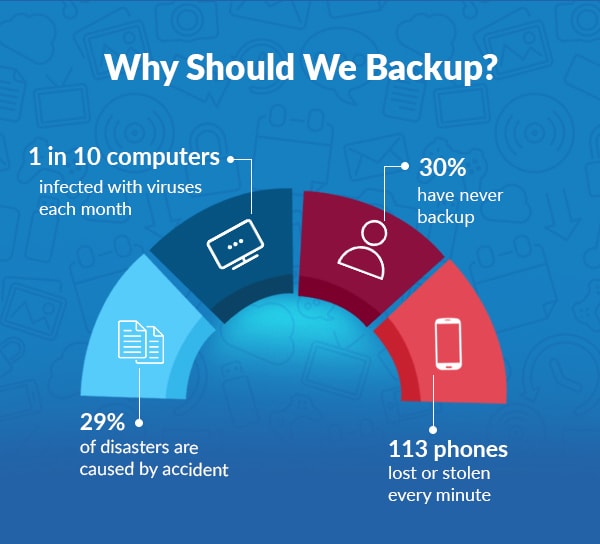
Data loss can happen due to various reasons. Devices can fail, human errors occur, or cyber-attacks can happen. Mitigating data loss risks is necessary to avoid such scenarios. Here are key points to consider:
- Risk Management: Identifies potential risks and implements strategies to minimize them.
- Disaster Recovery: Plans and processes to recover data in case of an emergency.
- Cybersecurity: Protects data from cyber threats like malware and ransomware.
Using data recovery methods is essential in case of data loss. These methods include restoring data from backups. Having a disaster recovery plan ensures quick data restoration. It reduces downtime and maintains business continuity.
Implementing information security measures helps protect against data breaches. This includes using strong passwords, encryption, and regular software updates. Data Loss Prevention (DLP) tools can also help. They monitor, detect, and prevent data breaches.
Effective risk management involves regular data backups and updates. It ensures data is always available and protected. Backup solutions like cloud storage offer additional security and redundancy. This makes data recovery more reliable.
In conclusion, data backup is essential for mitigating data loss risks. It ensures that data remains safe, secure, and accessible. Implementing effective backup and recovery solutions safeguards our valuable information.
Credit: www.stellarinfo.co.in
Types Of Data Loss
Data backup is essential in protecting valuable information. Understanding the types of data loss can help in creating effective backup solutions. Let’s explore common causes of data loss and how they impact business continuity and digital resilience.
Hardware Failures
Hardware failures are a common cause of data loss. Components like hard drives, SSDs, and servers can fail unexpectedly. These failures can disrupt business operations and affect IT infrastructure.
Here are some common hardware failures:
- Hard Drive Failures: Mechanical issues, read/write head crashes, and bad sectors can cause data loss.
- Power Surges: Sudden power spikes can damage hardware components, leading to data corruption.
- Overheating: Excessive heat can deteriorate hardware, causing system crashes and data loss.
Preventive measures include:
- Regular maintenance and monitoring of hardware components.
- Using surge protectors and uninterruptible power supplies (UPS).
- Ensuring proper ventilation and cooling systems.
A table summarizing common hardware failures and solutions:
| Hardware Failure | Potential Cause | Solution |
|---|---|---|
| Hard Drive Failure | Mechanical Issues | Regular Maintenance |
| Power Surge | Electrical Spike | Surge Protector |
| Overheating | Poor Ventilation | Cooling Systems |
Implementing robust backup solutions and cloud storage can enhance data protection and disaster recovery.
Cyber Attacks
Cyber attacks are a significant threat to data integrity. Hackers use various techniques to steal, corrupt, or destroy data. Cyber attacks can target any part of the IT infrastructure.
Common types of cyber attacks include:
- Ransomware: Malicious software that encrypts data, demanding a ransom for decryption.
- Phishing: Fraudulent emails or messages tricking users into revealing sensitive information.
- Malware: Software designed to disrupt, damage, or gain unauthorized access to systems.
Cyber attack prevention strategies:
- Regularly update and patch software to fix vulnerabilities.
- Educate employees on recognizing phishing attempts and safe browsing practices.
- Use robust antivirus and anti-malware programs.
Information security protocols and data loss prevention measures are crucial. Regular data recovery drills and cloud storage solutions can minimize downtime.
Human Errors
Human errors are inevitable and can lead to significant data loss. Mistakes can occur during data entry, file deletion, or system configuration.
Common human errors include:
- Accidental Deletion: Files or data are mistakenly deleted, often without a backup.
- Improper Configuration: Incorrect settings can lead to data corruption or exposure.
- Neglecting Updates: Failing to update software can leave systems vulnerable to attacks.
Reducing human errors involves:
- Implementing regular training programs for employees.
- Utilizing automated backup solutions to ensure data is regularly saved.
- Establishing clear protocols for data management and updates.
Here’s a quick guide to human error prevention:
- Educate and train employees regularly.
- Automate data backups and updates.
- Implement strict data management protocols.
By addressing human errors through proper education and automated backup solutions, organizations can improve data protection and digital resilience.
Backup Strategies
Backing up data is crucial for digital safety and data loss prevention. Implementing effective backup strategies ensures data recovery in case of unexpected events. This article explores different backup strategies to help you choose the best one for your needs.
Full Vs Incremental Backups
Evaluating Options for full and incremental backups is key to data protection. A complete backup copies all your data every time you back up. This method is simple but requires more storage space and time.
On the other hand, incremental backups save only the data that has changed since the last backup. This approach is more efficient in terms of storage and time. However, it can be more complex when it comes to data recovery.
Here’s a comparison table to help you decide:
| Backup Type | Storage Requirements | Time Efficiency | Data Recovery |
|---|---|---|---|
| Full Backup | High | Low | Simple |
| Incremental Backup | Low | High | Complex |
Backup frequency is another factor to consider. Frequent backups minimize data loss but require more resources. A balanced approach can be a combination of full backups at regular intervals and incremental backups in between.
Cloud Vs Local Backups
Deciding between cloud and local backup systems is another essential step. Cloud storage offers easy access to your data from anywhere. It often includes automatic backup solutions, enhancing digital safety. Cloud storage is scalable, allowing you to increase capacity as needed.
Local backup systems involve storing data on physical devices like external hard drives or NAS devices. This method ensures quick access to your data without internet dependency. Local backups are ideal for sensitive data that requires extra security.
Here’s a breakdown of these storage options:
| Backup Type | Accessibility | Cost | Security |
|---|---|---|---|
| Cloud Backup | High | Variable | Dependent on Provider |
| Local Backup | Limited | One-time | High (if secured properly) |
Combining both methods can be a strong strategy. Use cloud backups for disaster recovery and local backups for quick data recovery. This hybrid approach ensures comprehensive data protection.
Choosing Backup Solutions
Data backup is crucial in today’s digital age. It ensures that your valuable information remains safe and accessible. Choosing the right backup solutions is essential for effective data protection. This involves selecting the right software and storage devices to meet your specific needs. Let’s explore these options in detail.
Software Options
Several software options are available for backing up your data. Each offers unique features tailored to different needs. Here are some of the most popular choices:
- Online Backup Services: These services store your data on remote servers. They offer benefits like data integrity and system restore. Popular options include Google Drive, Dropbox, and iCloud.
- Cloud Storage: Cloud storage solutions, such as Amazon S3 and Microsoft Azure, provide scalable options for businesses. They ensure file redundancy and disaster recovery capabilities.
- Local Backup Software: Programs like Acronis True Image and EaseUS Todo Backup allow you to create backups on local devices. These tools offer features like data recovery and cloning.
Selecting the right software depends on factors such as budget, security requirements, and ease of use. Here’s a comparison of some popular software options:
| Software | Features | Price |
|---|---|---|
| Google Drive | Online Backup, Data Integrity, System Restore | Free up to 15GB |
| Amazon S3 | Cloud Storage, File Redundancy, Disaster Recovery | Pay-as-you-go |
| Acronis True Image | Local Backup, Data Recovery, Cloning | Starts at $49.99/year |
Storage Devices
Backing up your data requires reliable storage devices. Here are some common options:
- External Hard Drives: These are popular for their portability and large storage capacity. They are suitable for data protection and easy to use.
- Network Attached Storage (NAS): NAS devices connect to your network and provide centralized storage. They offer features like file redundancy and remote access.
- USB Flash Drives: These are compact and easy to carry. They are ideal for system restore and quick file transfers.
Each storage device has its pros and cons. Here is a comparison:
| Device | Capacity | Price Range |
|---|---|---|
| External Hard Drives | 500GB – 8TB | $50 – $200 |
| NAS Devices | 1TB – 16TB | $200 – $1000 |
| USB Flash Drives | 8GB – 256GB | $10 – $50 |
Deciding the right storage device depends on your specific needs. Consider factors like storage capacity, price, and ease of use. This will help ensure effective data protection and data recovery.
Backup Frequency
Backing up data is crucial for any business or individual. It ensures that important information is not lost due to unexpected events. A key part of any backup strategy is deciding how often to back up data. The backup frequency can greatly affect the effectiveness of your data recovery solutions. Choosing the right frequency depends on your needs and the nature of your data.
Daily Vs Weekly Backups
Deciding between daily and weekly backups is a critical part of your backup strategy. Daily backups are ideal for businesses with frequent data changes. They ensure that the most recent data is always protected. This is particularly important for financial institutions or e-commerce sites.
Daily backups offer several benefits:
- Reduced data loss: With daily backups, you lose only a day’s worth of data in case of failure.
- Better data protection: More frequent backups mean more points to restore from.
- Quicker recovery: It is easier to identify and correct errors with recent backups.
On the other hand, weekly backups may be sufficient for smaller businesses or individuals with less frequent data changes. They require less storage space and are less resource-intensive.
The main benefits of weekly backups include:
- Cost-effective: Less frequent backups reduce storage costs.
- Lower resource usage: Weekly backups use fewer system resources.
- Less complexity: Fewer backups mean simpler management.
Here is a comparison table for clarity:
| Backup Frequency | Pros | Cons |
|---|---|---|
| Daily | Reduced data loss, better protection, quicker recovery | Higher storage costs, more resource usage |
| Weekly | Cost-effective, lower resource usage, simpler management | Increased data loss risk, fewer restore points |
Real-time Backups
Real-time backups are another option for those needing constant data protection. This type of backup is essential for businesses that cannot afford any data loss. Real-time backups continuously save data as changes occur. This method is common in high-stakes industries like healthcare and finance.
Benefits of real-time backups include:
- Continuous protection: Data is always up-to-date and protected.
- Immediate recovery: Data can be restored almost instantly.
- Enhanced data loss prevention: Real-time backups minimize the risk of data loss.
Real-time backups often use cloud backup solutions. Cloud storage solutions allow data to be saved offsite, providing an extra layer of protection. They are an integral part of any disaster recovery plan.
But, real-time backups can be resource-intensive. They require robust cybersecurity measures to protect data during the backup process. Incremental backups can be used in conjunction to optimize resource usage. Incremental backups only save changes since the last backup, reducing the amount of data processed each time.
Consider these factors for real-time backups:
- Storage solutions: Choose a reliable cloud backup provider.
- Cybersecurity: Implement strong data protection measures.
- Backup frequency: Real-time might not be necessary for all data types.
In summary, the best backup frequency depends on your specific needs. Evaluate your data protection requirements and choose the most suitable option. Whether daily, weekly, or real-time, ensure your backup strategy is robust and reliable.
Testing Backup Integrity
Introduction paragraph about Need for Data Backup and Testing Backup Integrity…
Backing up data is crucial to protect against data loss. Yet, simply having backups isn’t enough. Ensuring that these backups are reliable requires testing their integrity. Testing backup integrity involves verifying that the data can be restored and is complete. Regular testing helps maintain the reliability of your data recovery process. Let’s explore the importance of regular restoration tests and verifying backup completeness.
Regular Restoration Tests
Regular restoration tests are vital in ensuring that your backup solutions are functional. You don’t want to find out during a crisis that your data recovery plan is flawed. Conducting these tests involves simulating a data loss scenario and attempting to restore data from your backup.
Here are steps to perform regular restoration tests:
- Schedule Tests: Plan tests at regular intervals. Depending on your backup frequency, you might test monthly, quarterly, or bi-annually.
- Select Data Samples: Choose a variety of data to restore. This includes critical files, applications, and databases.
- Simulate Failures: Create scenarios where data is lost. This can be due to hardware failure, accidental deletion, or cyber-attacks.
- Perform Restorations: Attempt to restore the selected data. Ensure the process is smooth and data integrity is maintained.
- Document Results: Keep detailed records of each test. Note any issues encountered and their resolutions.
By conducting regular restoration tests, you can confidently rely on your data recovery plan. You’ll know that your backup strategy, whether using cloud storage or local storage, is effective.
Verifying Backup Completeness
Verifying backup completeness ensures that all necessary data is backed up. Missing files can render a backup useless. This verification process involves checking that all critical information is included in your backups.
Steps to verify backup completeness:
- Review Backup Logs: Check logs for any errors or skipped files. Logs should detail every file that was backed up.
- Compare Data Sets: Regularly compare your live data with your backup data. Ensure there are no discrepancies.
- Check Data Integrity: Verify that the data in your backups is not corrupted. Use tools that check for file integrity.
- Test File Restoration: Randomly select files and restore them. Ensure they are complete and functional.
- Update Backup Strategy: Adjust your backup strategy if you find missing data. Ensure all new and modified files are included in future backups.
Ensuring backup completeness is part of a robust disaster recovery plan. It guarantees that your information protection measures are up to date. Regular checks and updates to your backup solutions keep your data secure and your recovery process efficient.
Compliance And Regulations
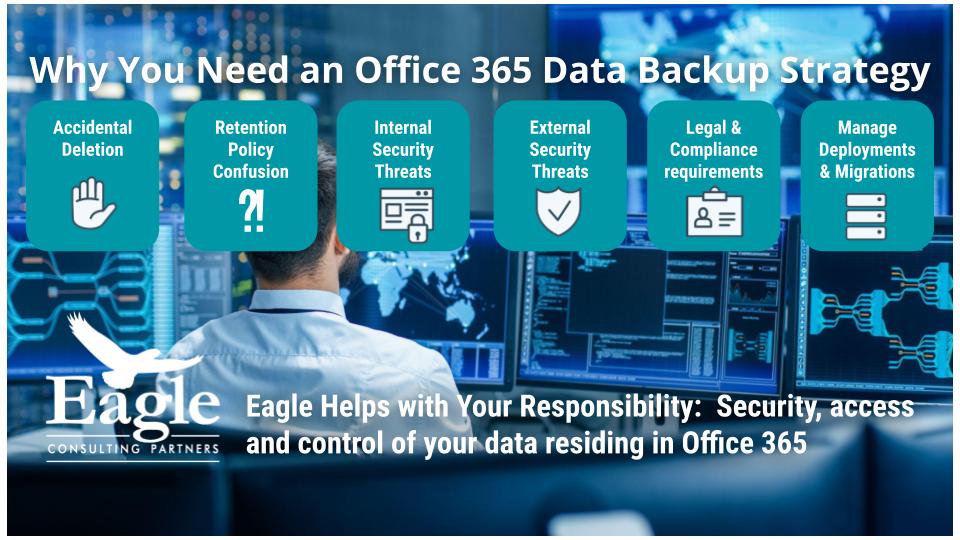
Data backup is essential for businesses of all sizes. It ensures the safety of valuable information. One crucial aspect is adhering to compliance and regulations. These rules ensure that organizations protect sensitive data. They also help avoid legal repercussions and financial penalties.
Data Protection Laws
Compliance with data protection laws is vital. These laws safeguard personal and sensitive information. They also ensure Data Integrity and Information Protection. Here are some key points:
- General Data Protection Regulation (GDPR): This law applies to all companies processing data of EU citizens. It enforces strict data handling and Data Security measures.
- California Consumer Privacy Act (CCPA): This law protects residents of California. It gives them control over their personal data. Companies must disclose what data they collect and how they use it.
- Health Insurance Portability and Accountability Act (HIPAA): This applies to healthcare providers. It requires strict protection of patient data. A strong Disaster Recovery Plan and regular Cloud Backup are essential.
Adhering to these laws ensures Risk Management. It also helps in maintaining customer trust. Non-compliance can lead to heavy fines. It can also damage a company’s reputation.
Here is a table summarizing key data protection laws:
| Law | Region | Key Requirement |
|---|---|---|
| GDPR | EU | Strict data handling and security measures |
| CCPA | California, USA | Disclosure of data collection and usage |
| HIPAA | USA | Protection of patient data |
Industry Standards
Industry standards play a crucial role in data backup. They ensure that Backup Solutions are effective and reliable. These standards also help in Data Recovery and Cybersecurity Measures. Here are some important standards:
- ISO/IEC 27001: This standard focuses on information security management. It ensures that organizations have a strong data protection framework. It includes risk assessment and mitigation strategies.
- National Institute of Standards and Technology (NIST): NIST provides guidelines for data security. It includes Risk Management and cybersecurity frameworks. Adopting these guidelines helps in maintaining Data Integrity.
- Payment Card Industry Data Security Standard (PCI DSS): This standard applies to companies handling card transactions. It requires robust security measures to protect cardholder data. Regular audits and Cloud Backup are recommended.
Adhering to these standards ensures a strong Information Protection framework. It also helps in developing a comprehensive Disaster Recovery Plan. This plan ensures quick Data Recovery in case of data loss.
Here’s a table summarizing key industry standards:
| Standard | Focus | Key Requirement |
|---|---|---|
| ISO/IEC 27001 | Information Security | Risk assessment and mitigation |
| NIST | Data Security | Risk management and cybersecurity |
| PCI DSS | Card Transactions | Robust security measures |
Credit: eagleconsultingpartners.com
Future Of Data Backup
In today’s digital age, the need for data backup has never been more critical. With the increasing reliance on digital data for personal and professional use, ensuring the security and availability of this information is paramount. As technology evolves, the future of data backup promises to be more advanced, secure, and efficient. This evolution is driven by emerging technologies and evolving trends in data security, which aim to provide robust Disaster Recovery and Data Integrity.
Emerging Technologies
The future of data backup is being shaped by several emerging technologies. These advancements are transforming how data is stored, accessed, and protected.
One of the most significant technologies is Cloud Storage. Cloud-based backup solutions offer scalability, flexibility, and off-site protection. This reduces the risk of data loss due to physical damage or theft. Key benefits include:
- Automatic backups
- Easy data recovery
- Cost-effectiveness
Another promising technology is Blockchain. It ensures Data Integrity by creating immutable records of data transactions. This technology is particularly useful in Digital Asset Management and ensuring data authenticity.
Artificial Intelligence (AI) and Machine Learning (ML) are also playing a crucial role. They help in predicting potential failures and optimizing backup processes. AI-driven systems can detect anomalies and trigger automatic backups, ensuring data is always protected.
The following table summarizes the key emerging technologies in data backup:
| Technology | Key Benefits |
|---|---|
| Cloud Storage | Scalability, Flexibility, Off-site Protection |
| Blockchain | Immutable Records, Data Authenticity |
| AI and ML | Predictive Analysis, Automated Backups |
Trends In Data Security
As data becomes more valuable, the need for robust data security measures is also increasing. Several trends are shaping the future of data security in backup solutions.
Ransomware Protection is a top priority. Ransomware attacks can encrypt and lock data, making it inaccessible. Modern backup solutions now include features to detect and prevent such attacks. This ensures that data remains secure and recoverable.
Another trend is the focus on Cybersecurity and Information Security. Protecting data from unauthorized access and breaches is crucial. Backup solutions are now integrating advanced encryption methods and multi-factor authentication to enhance security.
Data Recovery Services are also evolving. These services provide quick and efficient recovery of data in case of loss or damage. They ensure minimal downtime and disruption to operations.
Modern backup solutions are also emphasizing Data Protection. This includes regular audits, compliance with regulations, and ensuring data privacy. The following list highlights key trends in data security:
- Ransomware Protection
- Enhanced Cybersecurity Measures
- Advanced Encryption Methods
- Multi-factor Authentication
- Efficient Data Recovery Services
By staying updated with these trends, organizations can ensure their data remains safe and secure. Implementing these measures will provide peace of mind and ensure data availability in any scenario.

Credit: www.researchgate.net
Frequently Asked Questions
Why Is Data Backup Important?
Data backup is crucial to protect against data loss. It ensures you can recover vital information if your system crashes, gets hacked, or experiences hardware failure.
How Often Should I Back Up Data?
You should back up your data regularly. Ideally, perform backups daily or weekly to ensure recent data is protected.
What Are Common Data Backup Methods?
Common data backup methods include cloud storage, external hard drives, and network-attached storage (NAS). Each method offers different levels of convenience and security.
What Is Cloud Backup?
Cloud backup involves storing data on remote servers accessed via the internet. It offers easy access, automatic backups, and robust security measures.
Conclusion
Backing up data is essential. It protects against unexpected loss. It ensures vital information stays safe. Regular backups provide peace of mind. They minimize disruptions to work. Data loss can happen anytime. Be prepared. Prioritize data safety now. Invest in reliable backup solutions.
Your future self will thank you.